Edit with precision
Non-destructive trim ranges, split at the playhead, duplicate, reorder, clip markers, undo and redo.
 FramecraftBY 3DEFY FRAMECRAFT / Night drive · Spec ad.fcEDIT WORKSPACE Export ↗
From the first cut to the final frame.
A focused, local-first video editor for the stories only you can tell.
Automotive spec-ad visualization · Real footage: close-ups from Mixkit; drifting by anotherview (CC BY 3.0). Source · Licence · Trimmed, reordered & color adjusted. All footage credits
What you can do in the Windows development preview today.
Non-destructive trim ranges, split at the playhead, duplicate, reorder, clip markers, undo and redo.
Independent music and voice tracks, up to eight audio sources, gain controls, fades and cached waveforms.
Timed titles and captions with size, color and placement controls. Import and export subtitles as SRT.
Basic color controls, playback speed, rotation and mirroring. Check finishing with a rendered-frame preview.
Searchable media, cached thumbnails, resizable panels, composition guides, canvas ratios and light or dark workspaces.
Saved projects, atomic saves, recovery snapshots and media relinking. Queue H.264/AAC MP4 exports with resolution and frame-rate profiles.
In development: Android device testing and export, advanced video compositing, keyframes and transitions.
Scroll to get closer to the workspace.
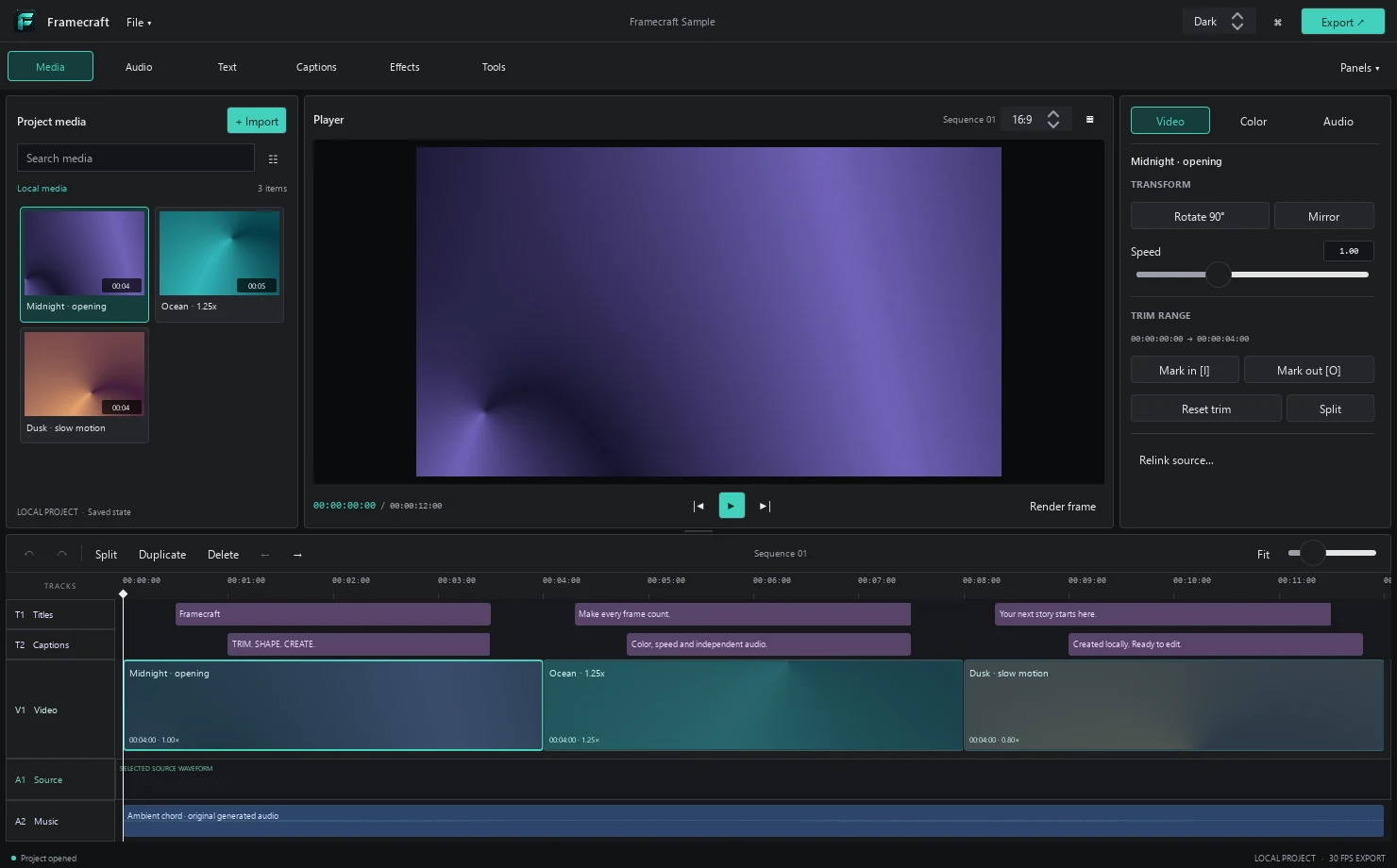
The essentials belong within reach. Bring in your footage, find the rhythm, and make the finishing touches yours.
Trim, split, duplicate and reorder. Scrub the ruler, find your moment, and keep experimenting with undo and redo.
Timeline illustrationAdd timed titles and captions. Adjust size, color and placement, or bring your subtitle workflow along with SRT import and export.
Fine-tune color and speed. Layer music or voice, set gain and fades, then check your finishing effects with a rendered-frame preview.
A media library, a generous player, and the controls that matter. Resize the panels. Choose the light.
Find your footage in a searchable grid or list. Keep the library, player and inspector arranged the way you work.
Actual desktop screenshots. The theme switch previews both interfaces.
Three animated scenes. Timed titles. Independent audio. This twelve-second sample was edited and rendered with Framecraft.
A WORKSPACE IN THE MAKING.Framecraft is in active development. The Windows preview is being tested locally. Android is on the roadmap.
More room for your ideas. Framecraft will be free to use.
Follow the developmentFramecraft is a development preview. A Windows build is being tested locally; a public download has not been released yet. Contact 3DEFY for preview availability.
Android is a target platform and the native application builds. Real-device testing and an Android export backend are still in development.
Framecraft is a desktop/mobile application. This page showcases the desktop build and plays a sample rendered with it. Editing and rendering in the current Windows build happen locally.
The Windows development build exports H.264/AAC MP4 with resolution and frame-rate profiles, clip finishing, timed text and independent audio. Advanced video compositing, keyframes and transitions remain in development.
Framecraft will be free to use. If you’d like to support its development, a coffee is always appreciated.

 Fuel the next frame